






Why Taskforce.sh?
Get full visibility and control over your BullMQ queues in production. Taskforce.sh gives you the control tower your team needs.
Catch issues instantly
Get alerted the moment a job fails or a queue backs up, before your users are affected.
Manage from your browser
Retry, promote, clean, and inspect jobs from an intuitive UI, no SSH or CLI needed.
Understand performance
Real-time metrics and throughput charts for every queue so you can spot bottlenecks fast.
Empower your team
Invite team members with custom roles and granular permissions, everyone gets the access they need.
Keep schedulers on track
See every repeatable and cron job, when it last ran, and when it fires next, all in one view.
Set up in minutes
Connect via a Redis URL or the lightweight Taskforce Connector, your queues appear automatically.
Let AI operate your queues, safely
Give AI agents a scoped, audited way to triage and fix queue issues over MCP, with the same permissions you'd give a teammate.
Everything you need to manage your queues
A complete toolkit purpose-built for BullMQ and Bull, with deep integration into every feature of your queue system.
Real-time Dashboard
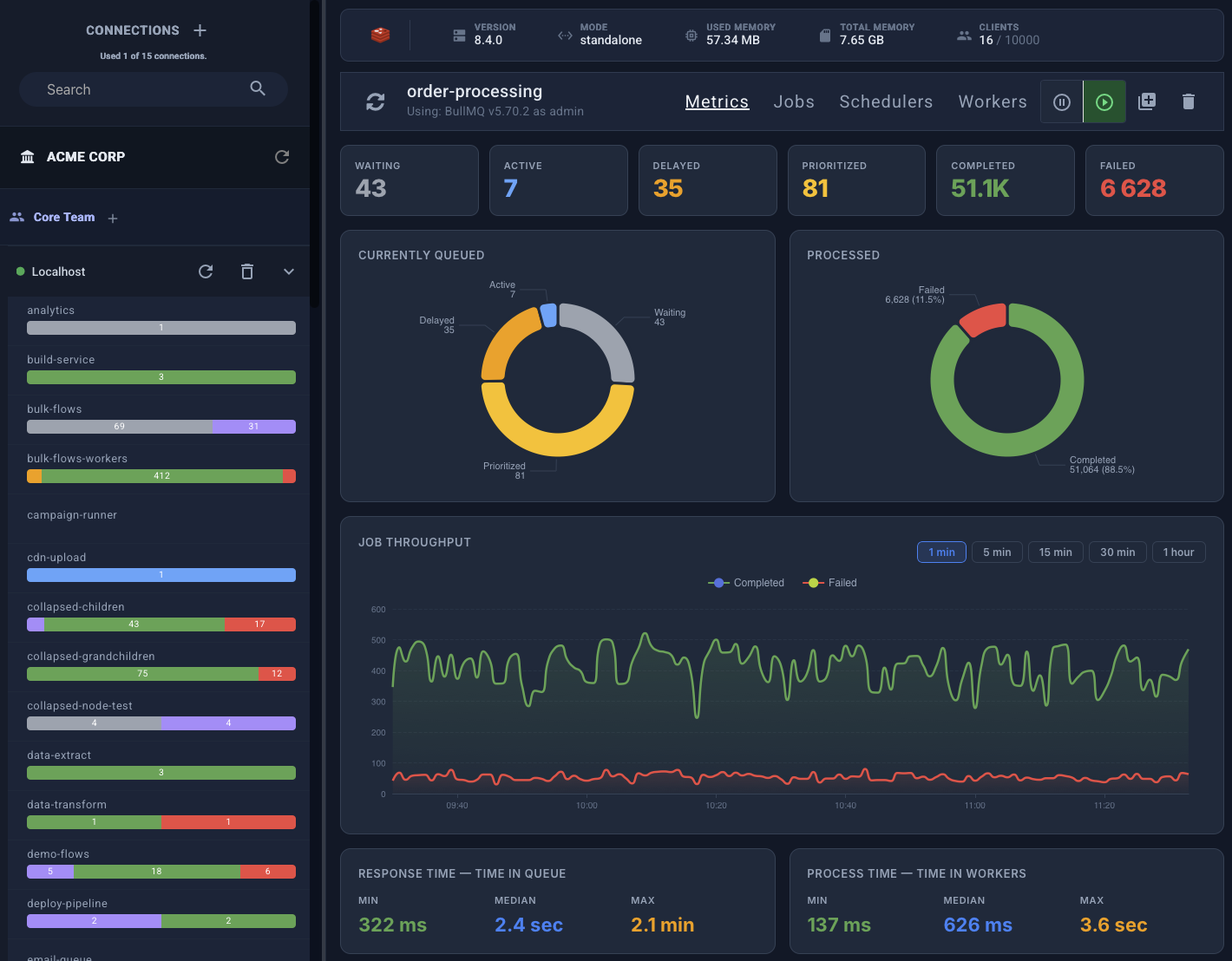
Get a live overview of all your queues, jobs, and workers in a single, intuitive interface. Instantly see queue health, throughput, and job statuses.
AI Agents (MCP)
Connect AI assistants like Claude, Cursor, or your own agents to your queues over the Model Context Protocol. They investigate failures and take action, bounded by scoped permissions and a full audit trail.
Metrics & Analytics
Track queue performance over time with built-in metrics. Identify bottlenecks, monitor processing rates, and optimize your job pipelines.
Monitoring & Alerts
Get alerts by email, Slack or PagerDuty when jobs fail, workers go missing, the backlog grows or Redis runs low on memory, before your users notice.
Flow Visualization
Visualize parent-child job relationships and complex workflows. Trace job dependencies and understand how data flows through your system.
Job Management
Retry failed jobs, promote delayed jobs, clean queues, and inspect job data, all from the UI. Bulk operations save hours of manual work.
Scheduled Jobs
Monitor repeatable and cron-based jobs. See when the next execution is, track history, and manage schedules without touching code.
Teams & Organizations
Collaborate with your team. Create organizations, invite members, and manage access across your queue infrastructure.
Custom Roles & Permissions
Define granular permissions for each team member. Control who can add, delete, retry jobs, pause queues, and more with custom roles.
Workers Overview
See every worker connected to your queues, and get an alert when fewer workers than you expect are running.
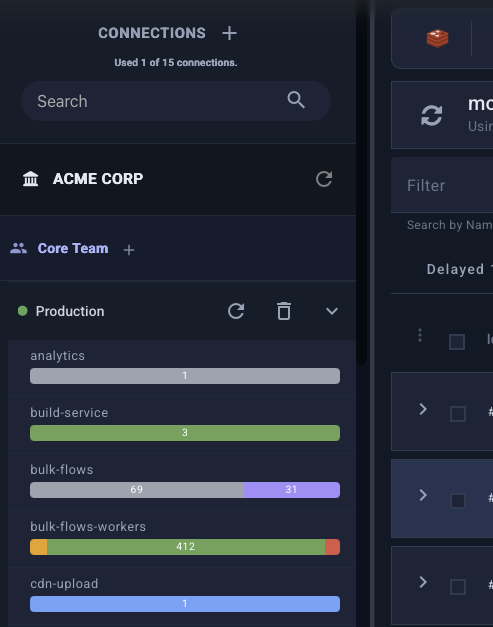
See every queue at a glance
The dashboard gives you an instant overview of all your connections and queues. Track job counts by state, monitor processing rates, and get alerted by email, Slack or PagerDuty when jobs fail, workers go missing or the backlog grows.
- Live job counts across all states
- Processing rate and throughput metrics
- Alerts for failed jobs, missing workers, backlog and Redis memory
- Automatic queue discovery
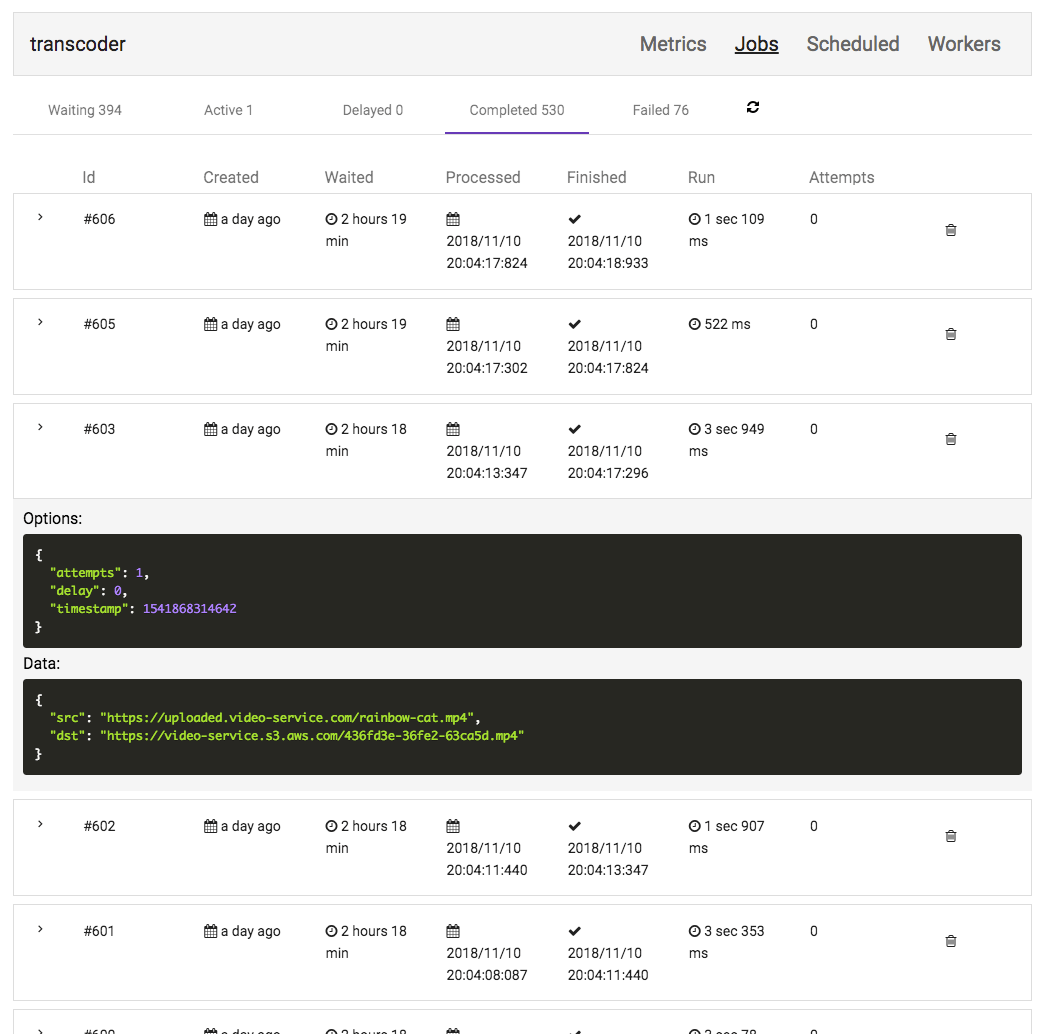
Inspect and manage every job
Browse jobs by state: completed, failed, delayed, waiting, and more. View job data, logs, and stack traces. Retry, promote, or clean jobs in bulk with a few clicks.
- Filter jobs by any state
- View job data, logs, and errors
- Bulk retry, promote, and clean actions
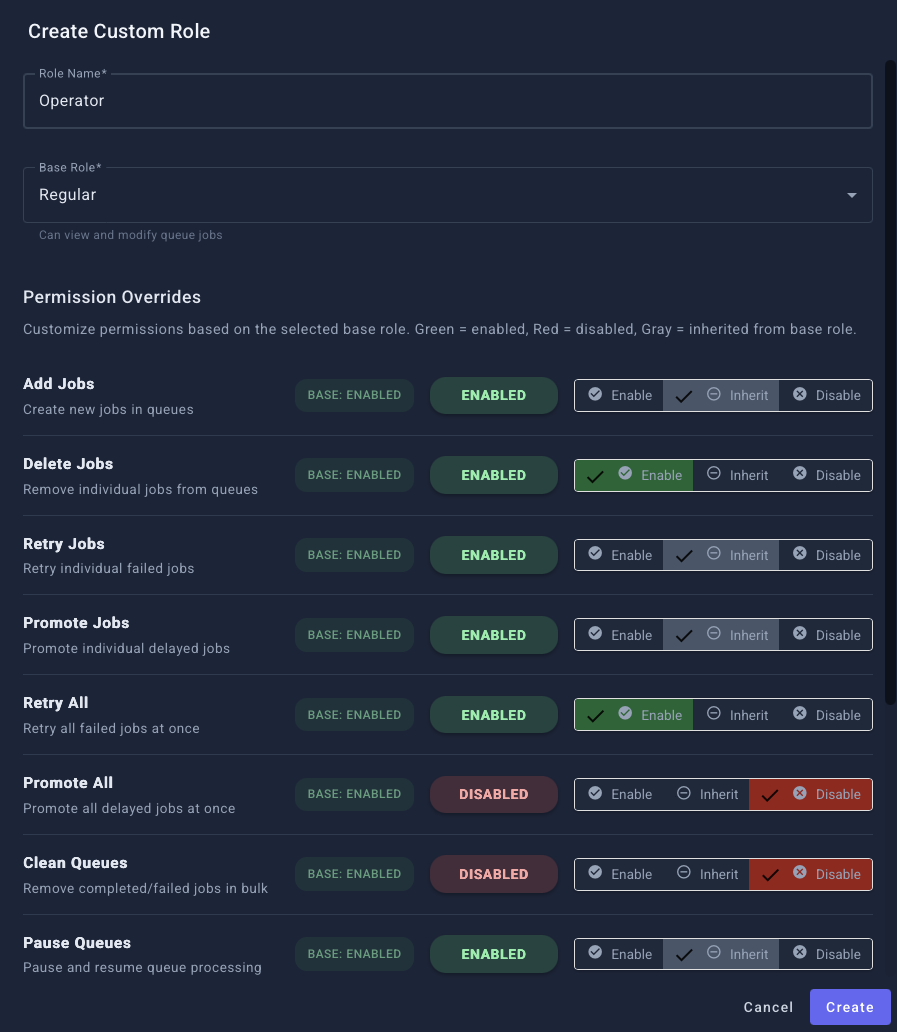
Collaborate with confidence
Create organizations, invite team members, and assign custom roles with granular permissions. Control exactly who can retry jobs, pause queues, or clean data, perfect for teams with different access needs.
- Organizations and team management
- 12 granular queue permissions
- Custom roles with permission overrides
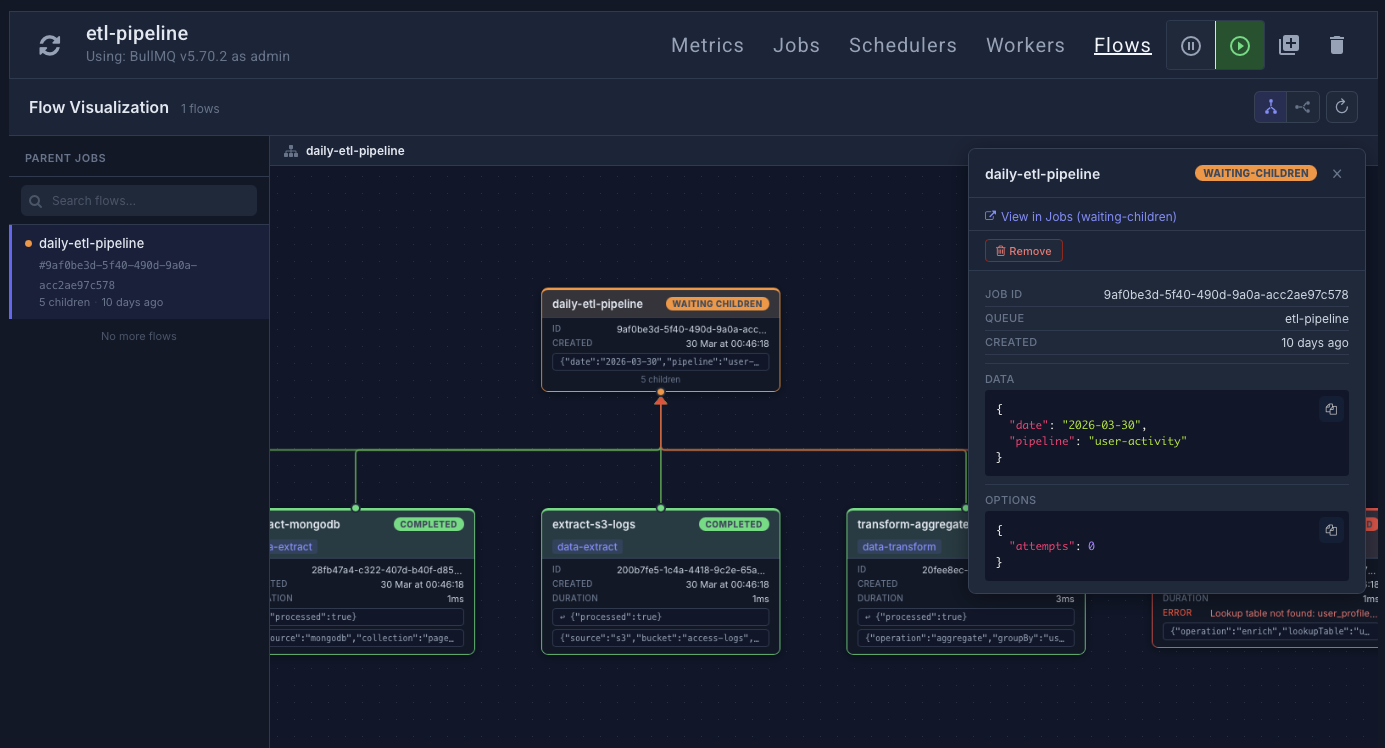
Trace complex job workflows at a glance
Visualize parent-child job hierarchies as interactive node graphs. Drill into any branch of a flow, inspect individual jobs, and understand exactly how data moves through multi-step pipelines, even across queues.
- Interactive flow diagrams with pan and zoom
- Color-coded state for every job in the tree
- Click any node to inspect data, logs, and errors
- Cross-queue flows with automatic subtree navigation
Let AI operate your queues, with guardrails
Add AI agents as first-class, non-human team members. Connect Claude, Cursor, or your own agent over the Model Context Protocol and let it investigate failures, retry the jobs that are safe, and escalate the ones that aren't, all bounded by the exact same permissions you'd give a teammate, and recorded in a full audit trail.
- Per-agent tokens with granular, per-team permissions
- Read-only tokens for safe, look-but-don't-touch access
- Every action audited, with allowed/denied outcomes
- Works with any MCP client, no custom integration
Enterprise-grade security
Your queue data deserves the highest level of protection. Taskforce.sh meets rigorous security and privacy standards.
SOC 2 Type II
Independently audited controls for security, availability, and confidentiality. Your data is handled with the highest standards.
GDPR Compliant
Full compliance with EU data protection regulations. Data processing agreements, right to deletion, and data minimization.
Encrypted Connections
TLS between your browser, the Taskforce Connector and Taskforce.sh, and to Redis when you enable it. The Taskforce Connector creates a secure tunnel, your Redis never needs public exposure.
On-Premises Option
Deploy Taskforce.sh on your own infrastructure. Keep your queue data within your network with no limits on connections or team size.
Simple, transparent pricing
Start with a 15-day free trial, then choose the plan that fits your needs. Save 2 months with yearly billing.
Starter
For individual developers and small projects
- 1 Connection
- Unlimited queues
- Unlimited users
- Real-time monitoring
- Alerts & notifications
- Metrics dashboard
- Job management tools
- Scheduled jobs
- Community support
Growing
For growing teams and production workloads
- 5 Connections
- Unlimited queues
- Unlimited users
- Real-time monitoring
- Alerts & notifications
- Metrics dashboard
- Organizations & teams
- Custom roles
- Premium email support
Enterprise
For large teams with high-throughput systems
- 15 Connections
- Unlimited queues
- Unlimited users
- Real-time monitoring
- Alerts & notifications
- Metrics dashboard
- Organizations & teams
- Custom roles
- Priority email support
Need more connections or a custom plan? Contact us.
Deploy on your own infrastructure
Run Taskforce.sh on-premises with Docker or on AWS. No connection limits, no team size restrictions, and your queue data stays in your own network.
Frequently asked questions
Everything you need to know about Taskforce.sh. Can't find an answer? Get in touch.
You can connect your queues in two ways: by providing a direct Redis connection string (with optional TLS) or by using the lightweight Taskforce Connector. The connector runs alongside your application and securely tunnels queue data to the dashboard via WebSockets, no need to expose your Redis instance to the internet.
Absolutely. Taskforce.sh is SOC 2 Type II certified and GDPR compliant. Taskforce.sh and the Taskforce Connector always use TLS encryption, and direct Redis connections use it when you enable it. When using the Taskforce Connector, your Redis instance stays fully private, data is transmitted through a secure WebSocket tunnel. We never store your job payloads on our servers.
Yes! The Taskforce Connector makes local development effortless. Just run the connector pointing to your local Redis server, and all your queues will appear in the dashboard instantly. No configuration changes needed.
Yes, Taskforce.sh supports both Bull and BullMQ queues. It's built by the original authors of Bull and BullMQ, so you get first-class support for every feature of both libraries. Still on Bull? See Taskforce.sh for Bull.
Yes. Taskforce.sh exposes a Model Context Protocol (MCP) endpoint, so you can connect AI assistants like Claude or Cursor, or your own agents, and let them investigate and act on your queues. Agents are added as non-human team members with their own tokens and permissions: give them read-only access or scoped write access, and every action they take is recorded in an audit trail you can review and export.
Yes. Taskforce.sh offers an on-premises edition that you can deploy on your own infrastructure with Docker. The on-premises version has no limitations on connections or team size and keeps your queue data within your network.
After your 15-day free trial, you can choose a plan that fits your needs. Your data and configuration are preserved, just subscribe and you're back up and running instantly.
Taskforce.sh is built by the team behind the open source projects Bull and BullMQ, the most popular job queue libraries for Node.js, with over 9 million BullMQ downloads a week. The team develops Taskforce.sh at its Swedish company, BullForce Labs AB, and sells it through the US subsidiary, Taskforce.sh Inc., which is SOC 2 Type II certified and GDPR compliant.
Ready to take control of your queues?
Join hundreds of engineering teams using Taskforce.sh to monitor and manage their BullMQ and Bull queues in production.
15-day free trial · No credit card required
